We independently review everything we recommend. When you buy through our links, we may earn a commission. As an Amazon Associate we earn from qualifying purchases.
Best Pen-Enabled Windows Tablets for Handwritten Notes
Best pen-enabled Windows tablets for handwritten notes: five Windows tablets with pen support, compared for writing feel, screen size and battery life.
Best pen-enabled Windows tablets for handwritten notes: five Windows tablets with pen support, compared for writing feel, screen size and battery life.
Disclosure: As an Amazon Associate, this site may earn from qualifying purchases made through links on this page.
A pen-enabled Windows tablet turns note taking into something closer to paper. You write directly on the screen, your handwriting becomes searchable text, and the same device runs the full desktop apps you already use for work or school. The catch is that not every Windows tablet with a touchscreen is a good writing tablet. Some have pens that lag, screens that smudge, or batteries that fade before the day ends.
This guide covers five Windows tablets that support pen input and suit handwritten notes. Two of them ship with a pen in the box. Three need a pen bought on its own, and each pick says so plainly, so there are no surprises after checkout. All five run Windows 11, all five accept a pressure-sensitive pen, and all five were checked against live Amazon listings before this article was written.
The picks span three sizes. The 10.5-inch Surface Go 4 is the most portable. The 12-inch Surface Pro 12 sits in the middle. The 13-inch and 13.4-inch models give you more room for split-screen notes beside a textbook or a document. If you write for hours at a time, screen size and pen feel matter more than raw speed, and this guide weights them that way.
At a Glance
Microsoft Surface Pro 11 Copilot+ PC Bundle — the complete kit: 13-inch 2.8K touchscreen, Snapdragon X Plus, 16GB of RAM, 512GB of storage, Pro Keyboard and Slim Pen in the box.
ASUS ROG Flow Z13 (2025) — the most powerful pick: 13.4-inch 2.5K touchscreen at 180Hz, Ryzen AI MAX+ 395, 32GB of RAM, 1TB of storage, stylus included.
Microsoft Surface Pro 12 — the most portable Pro: 12-inch touchscreen, Snapdragon X Plus, 16GB of RAM, 512GB of storage, pen sold on its own.
Microsoft Surface Go 4 — the smallest and lowest-weight pick: 10.5-inch touchscreen, 8GB of RAM, 128GB of storage, Windows 11 Pro, pen sold on its own.
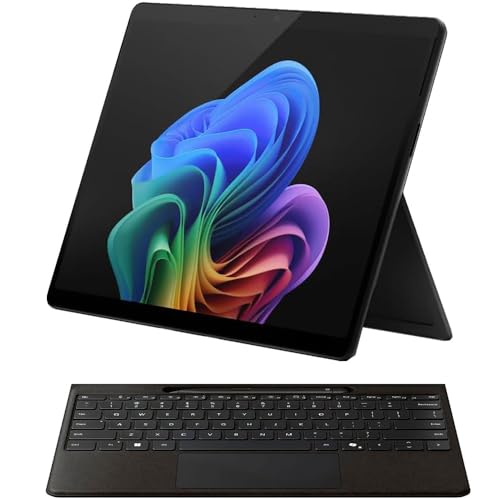
Microsoft Surface Pro 11 Snapdragon X Elite Bundle — the OLED pick: 13-inch OLED touchscreen, Snapdragon X Elite, 16GB of RAM, 1TB of storage, Pro Keyboard in the box.
How to Choose
Pen in the box or pen on its own. Two picks in this guide include a pen. Three do not. A pen bought on its own adds to the total outlay, and not every pen works with every tablet, so check compatibility before you buy. Surface tablets use the Surface Pen family. The ROG Flow Z13 includes a stylus with the tablet, which removes the guesswork.
Screen size and weight. A 10.5-inch tablet fits in a small bag and holds in one hand while you write with the other. A 13-inch tablet gives you room for a note page beside a reading pane, but it weighs more and needs a bigger bag. If you write at a desk, go bigger. If you write standing up, on a train, or walking between rooms, go smaller.
Refresh and writing feel. A higher refresh screen makes pen strokes appear sooner and look smoother. The ROG Flow Z13 runs at 180Hz, which is the highest-refresh screen in this group. The Surface models run at 60Hz or 120Hz depending on configuration, and all of them support palm rejection, so your resting hand does not leave stray marks.
Battery life. Pen tablets with ARM chips, like the Snapdragon X Plus and Snapdragon X Elite models here, tend to last longer on a charge than Intel models of similar size. The Surface Pro 11 and Surface Pro 12 are the endurance picks in this group. The Surface Go 4 has the smallest battery, which fits its smaller body.
Storage. Handwritten notes take almost no space. What fills storage is apps, documents, and media. 128GB is enough for notes and a modest app library. 512GB or 1TB suits anyone who also keeps large documents, photos, or video on the same device.
Keyboard. A detachable keyboard turns a tablet into a laptop for typing-heavy days. Two picks in this guide include a keyboard in the box. The others accept a keyboard bought on its own. If you type as much as you write by hand, a bundle with a keyboard in the box saves a separate purchase.
The Surface Pro 11 bundle is the most complete pen setup in this guide. The box holds the tablet, the Sapphire Pro Keyboard, and the Slim Pen, so you can write by hand and type on a keyboard from the first day. The 13-inch 2.8K touchscreen is large enough for a full note page beside a document, and the Snapdragon X Plus chip with 16GB of RAM handles note apps, browsers, and office software without hesitation. Storage is 512GB, which leaves room for a large document library.
Handwriting on the Pro 11 feels direct. The Slim Pen charges in the keyboard storage slot, so it is always with the tablet and always charged. Palm rejection keeps stray marks away while your hand rests on the screen. Battery life is among the longest in this group, which matters when you write through a full day of classes or meetings without hunting for an outlet. Windows 11 Pro is included, and the Copilot+ features add handwriting-to-text tools that convert your notes into typed text.
This is the pick for anyone who wants one purchase that covers writing, typing, and all-day use. It is also the largest Surface in this group, so it needs a bag that fits a 13-inch device.
The ROG Flow Z13 is the most powerful tablet in this guide, and it includes a stylus. Its 13.4-inch touchscreen runs at 2.5K resolution and 180Hz, which is the highest refresh in the group. Pen strokes appear almost at once, and the screen stays smooth when you scroll through long documents. The Ryzen AI MAX+ 395 chip with 32GB of RAM and 1TB of storage is far more than note apps need, which means this tablet also handles heavy multitasking, photo work, and games when the notes are done.
The stylus is included with the tablet, per the listing, so there is no separate pen purchase to arrange. The 13.4-inch size gives you generous writing room, and the 2-in-1 design folds back for a flat writing surface. It is the heaviest pick in this group, so it suits desk and lap use more than one-handed writing. Battery life is shorter than the Snapdragon models here, because the hardware draws more power.
This is the pick for anyone who wants the smoothest pen experience and a tablet that doubles as a high-performance machine. If your notes live beside demanding apps, the Flow Z13 keeps up with both.
The Surface Pro 12 is the most portable Pro in this guide. Its 12-inch touchscreen is smaller than the Pro 11, and the whole device is lighter and easier to carry. It runs the Snapdragon X Plus chip with 8 cores, 16GB of RAM, and 512GB of storage, so it matches the larger Pro 11 on memory and storage while giving up a little screen space. It is a Copilot+ PC running Windows 11, and it supports the Surface Pen family.
The pen is sold on its own with this listing, so budget for a Surface Slim Pen or Surface Pen if you do not already own one. The 12-inch size is a good middle ground: large enough for comfortable handwriting, small enough to hold in one hand while you write with the other. Battery life is strong, in line with the other Snapdragon models here.
This is the pick for anyone who carries a tablet everywhere and writes on the move. It trades a little screen space for a lighter bag and a smaller footprint on a crowded desk.
The Surface Go 4 is the smallest and lowest-weight tablet in this guide. Its 10.5-inch touchscreen fits in bags that are too small for a 13-inch device, and it holds comfortably in one hand. It runs Windows 11 Pro with 8GB of RAM and 128GB of storage, and the Intel N200 chip handles note apps, browsers, and office software. The listing names 128GB of storage, so this is a notes-first device rather than a media library.
The pen is sold on its own with this listing. A Surface Pen pairs with the Go 4, and the tablet supports palm rejection, so your hand rests on the screen while you write. The small screen means less room for split-screen work, but for pure handwriting it is the most paper-like pick in the group. Battery life is the lowest here, which follows from the smaller body.
This is the pick for anyone who wants the lowest-weight possible note tablet and writes mostly by hand. It is also the simplest way into pen notes on Windows if you already own a compatible Surface Pen.
The Snapdragon X Elite bundle is the OLED pick in this guide. Its 13-inch OLED touchscreen shows deeper blacks and stronger contrast than the other Surface screens here, which makes handwriting look crisp and ink look darker on the page. The Snapdragon X Elite chip with 16GB of RAM and 1TB of storage is the largest storage option in this group, and the bundle includes the Surface Pro Keyboard, so typing is covered from the first day.
The pen is not named in the bundle listing, so plan on buying a Surface Pen on its own. The OLED screen is the reason to choose this pick over the standard Pro 11 bundle: if you write for hours, the higher contrast and richer ink make long sessions easier on the eyes. Battery life is strong, matching the other Snapdragon models. The 13-inch size gives you the same roomy writing area as the first pick.
This is the pick for anyone who wants the best-looking screen in the group and the largest storage. It suits writers who keep years of notes, documents, and media on one device.
You want one box with everything inside. Take the Surface Pro 11 bundle. Tablet, keyboard, and Slim Pen arrive together, and the 13-inch screen suits long writing sessions at a desk or in class.
You want the smoothest pen and the most power. Take the ROG Flow Z13. The 180Hz screen and the included stylus give you the most responsive writing in this group, and the hardware handles anything else you run beside your notes.
You carry your tablet everywhere. Take the Surface Pro 12. The 12-inch size and Snapdragon battery life suit all-day carry, and the pen pairs from the Surface Pen family.
You want the smallest, lowest-weight note tablet. Take the Surface Go 4. The 10.5-inch screen and light body suit one-handed writing, and Windows 11 Pro covers the same note apps as the larger models.
You want the best screen and the most storage. Take the Surface Pro 11 Snapdragon X Elite bundle. The OLED display and 1TB of storage suit writers who keep a large library of notes and documents on one device.
FAQ
Do I need to buy a pen separately?
It depends on the pick. The Surface Pro 11 bundle and the ROG Flow Z13 include a pen or stylus. The Surface Pro 12, Surface Go 4, and Snapdragon X Elite bundle list no pen in the box, so a compatible pen is a separate purchase.
Will any stylus work with these tablets?
No. Surface tablets use the Surface Pen family, including the Surface Slim Pen and Surface Pen. The ROG Flow Z13 includes its own stylus. Check the listing for the exact pen named before you buy a separate one.
Can Windows convert my handwriting into typed text?
Yes. Windows 11 includes handwriting-to-text input, and apps such as OneNote accept handwritten notes and can convert them. The Copilot+ models add further handwriting tools.
Is 8GB of RAM enough for note taking?
Yes, for notes, browsers, and office apps. The Surface Go 4 runs those workloads on 8GB without trouble. If you also edit large documents or run many apps at once, 16GB or 32GB gives you more headroom.
Does the pen need charging?
The Surface Slim Pen charges in the keyboard storage slot on the Pro 11 bundle. The Surface Pen uses a replaceable battery. The ROG Flow Z13 stylus follows the guidance in its own listing, so check the included documentation.
Is a 10.5-inch screen too small for handwritten notes?
No, for pure handwriting. The Surface Go 4 screen fits a full note page at a readable size. It feels tight only when you split the screen between notes and a second document.
Final Take
The Surface Pro 11 bundle is the safest all-round choice: pen and keyboard in the box, a large screen, and long battery life. The ROG Flow Z13 suits anyone who wants the smoothest pen and the most power in the same device. The Surface Pro 12 is the portable middle ground, the Surface Go 4 is the lowest-weight way to write by hand, and the Snapdragon X Elite bundle adds an OLED screen and 1TB of storage. Whichever you choose, confirm the pen situation in the listing before you buy, because that single detail decides whether you can write on the first day or need one more purchase.
9
99klik Editorial Team
We compare specs, materials and verified owner reviews before a product earns a spot. Rankings are never paid.
Affiliate disclosure. As an Amazon Associate we earn from qualifying purchases at no extra cost to you. Prices accurate as of the date shown.
Compare the best x99 motherboards tomshardware readers still pick for Xeon E5 and Core i7 builds: five MACHINIST LGA 2011-3 boards by size, memory and storage.
Find the best sensor size for mirrorless cameras by comparing full-frame, APS-C and Micro Four Thirds bodies on image quality, low light, size and cost.
Compare adjustable chairs for home and office use by seat height, lumbar support, headrest and armrest adjustment, tilt, swivel and stated capacity today.
Galaxy Z Flip vs Galaxy S20 Ultra compared on display, cameras, battery and size, with five Amazon Renewed picks to help you choose the right 2020 Samsung.
Best Japanese vegetable cleaver guide: five nakiri knives compared on steel, edge angle, handle and weight, so you can pick the right one for produce prep.
What is a UPS battery? It is the sealed lead-acid battery inside a UPS that keeps devices running during an outage. See how it works and the best 12V 9Ah picks.
Does RV battery work directly offf batery or throungh nverter? DC loads run off the battery; AC loads need an inverter. See five 12V 100Ah RV batteries.
Can one replace the battery in a t900 tablet? Yes — the Galaxy Tab Pro 12.2 SM-T900 uses a 9500mAh cell. See five replacement kits and what the swap involves.
The best metals for earth battery builds are copper, magnesium, and aluminum-zinc. Compare voltage pairs and forms, and how long each metal lasts in soil.

 1. Microsoft Surface Pro 11 Copilot+ PC Bundle
 3. Microsoft Surface Pro 12
 4. Microsoft Surface Go 4
 5. Microsoft Surface Pro 11 Snapdragon X Elite Bundle