We independently review everything we recommend. When you buy through our links, we may earn a commission. As an Amazon Associate we earn from qualifying purchases.
5 Best Gaming Computers for Every Gamer (November 2026)
Five prebuilt gaming computers with RTX graphics, fast memory, and roomy SSDs compared side by side, so you can match a desktop to your games and desk.
Five prebuilt gaming computers with RTX graphics, fast memory, and roomy SSDs compared side by side, so you can match a desktop to your games and desk.
Buying a gaming computer is really a decision about how much machine to buy for the games you actually play and the monitor sitting on your desk. A tower built around a modest graphics card can feel generous at 1080p and cramped at 1440p, while a stronger graphics card paired with too little memory can stutter in the middle of a busy match. The choice is not about chasing the biggest numbers on the box; it is about matching the processor, graphics card, memory, and storage to the resolution you play at and the other work the computer will do.
This guide is for first-time buyers who want a ready-to-play tower, for players replacing an ageing desktop, for households where one computer serves gaming and school or office work, and for streamers who record while they play. Every computer below is a prebuilt desktop sold on Amazon, and each one was chosen from the processor, graphics card, memory, and storage named in its Amazon product listing.
Quick Picks
As an Amazon Associate we earn from qualifying purchases
Product
Best for
Key spec from title
Skytech Archangel (Intel Core i7-12700F)
A first serious tower with liquid cooling included
A white showpiece tower with a fast eight-core processor
AMD Ryzen 7 9700X, RTX 4060 8GB, 16GB DDR5 6000
How to Choose
Match the graphics card to your monitor
The graphics card sets the ceiling for how smoothly games run, so start with the screen you already own or plan to buy. A GeForce RTX 4060 with 8GB of video memory handles 1080p play comfortably and stretches to 1440p in less demanding titles, while the RTX 4060 Ti with 16GB of video memory gives 1440p more breathing room in detailed scenes. Every computer in this guide carries one of those two cards. Before ordering, check that the tower has the outputs your monitor needs, since a card with one HDMI port and two DisplayPort outputs suits a dual-screen desk better than a card with a single output.
Look past the processor name
Processor names hide as much as they reveal, because a Core i5, Core i7, or Ryzen 5 can differ in core count, boost clock, and socket. The Ryzen 5 7600 and Ryzen 7 9700X in this guide sit on AMD’s AM5 socket, which leaves a clear path to a later swap, while the Intel Core i5-13400F and Core i7-13700F use a platform with less upgrade room. Core counts matter when a game runs alongside voice chat, a browser full of guides, and a recording tool. A six-core processor copes with that mix, but an eight-core chip such as the Ryzen 7 9700X or a sixteen-core design like the Core i7-13700F keeps background tasks from stealing frames.
Memory and storage decide how the PC feels day to day
Memory and storage shape the everyday feel of a gaming computer more than most buyers expect. Sixteen gigabytes is the working minimum for modern games, and every tower here meets it, yet the type matters: DDR5 memory at 5200 or 6000 speed moves data faster than DDR4 at 3200, which shows up in loading screens and large open maps. Storage is the other half of the equation. A 500GB drive fills quickly once a few large games are installed, so the 1TB NVMe drives on four of these five towers are a real advantage. Check that the drive is a fast NVMe model rather than a slower SATA unit, and that a spare slot exists for a second drive.
Check cooling, power, and room to upgrade
A gaming computer lives or dies by its cooling and its power supply, two parts rarely in the headline. The Skytech towers in this guide include liquid coolers of 240mm and 360mm, which keep their processors quieter under load than a basic air cooler, while the iBUYPOWER and CyberPowerPC towers rely on air cooling with RGB fans. Power supply wattage matters when you plan a later graphics card upgrade: a 650W Gold-rated unit leaves more headroom than a 600W unit. A tempered-glass side panel shows off the build, but a mesh front panel moves air better, and a standard mid-tower layout makes adding memory or storage a ten-minute job instead of a rebuild.
The Skytech Archangel pairs a twelve-core Intel processor with an RTX 4060 and a 240mm liquid cooler, which makes it the most complete out-of-the-box package for a buyer who wants strong performance without opening the case. Its white tempered-glass case looks at home on a light-coloured desk, and the 1TB NVMe drive holds a healthy library of large games. The 600W Gold power supply and the liquid cooler give it a quieter character than most towers at this level, and the combination of a fast processor and dedicated graphics suits both gaming and heavier tasks such as video editing.
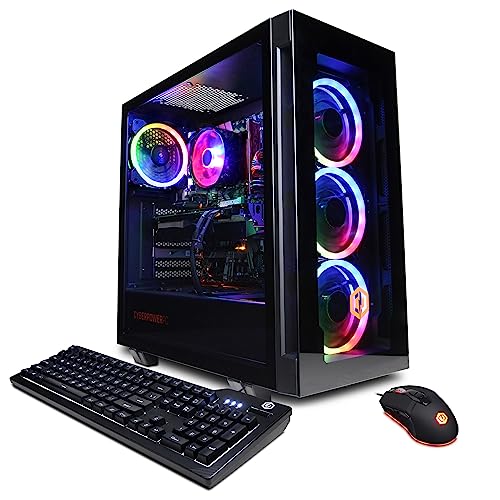
The CyberPowerPC Gamer Xtreme VR built around the Core i5-13400F is the straightforward pick for everyday 1080p gaming on a modern platform. Its RTX 4060 with 8GB of video memory covers the most popular competitive and story-driven games, while 16GB of DDR5 memory and a 1TB PCIe Gen4 SSD keep load times short and multitasking smooth. Wi-Fi is built in, so the tower works in a room without a wired network point, and Windows 11 Home arrives ready to set up. This is the tower to choose when the goal is a dependable machine that plays well today and leaves the door open to a graphics card upgrade later.
Specs:
Processor: Intel Core i5-13400F 2.5 GHz
Graphics: NVIDIA GeForce RTX 4060 8GB
Memory: 16GB DDR5
Storage: 1TB PCIe Gen4 NVMe SSD
Chipset: Intel B760
Operating system: Windows 11 Home 64-bit
Connectivity: Wi-Fi ready
Display outputs: 1x HDMI, 2x DisplayPort
Best for: Everyday 1080p gaming in a room where Wi-Fi is the only network option.
Watch out for: The 8GB of video memory is the limiting factor at 1440p, so confirm your monitor resolution before ordering.
The second CyberPowerPC in this guide steps up to a Core i7-13700F and an RTX 4060 Ti with 16GB of video memory, which is the combination to choose when 1440p is the target. The extra video memory matters in games with large textures and detailed open worlds, where an 8GB card starts to struggle, and the sixteen-core processor keeps a game, voice chat, and a browser running side by side without hitching. Sixteen gigabytes of DDR5 memory and a 1TB NVMe SSD round out a balanced specification. This tower suits a player who wants one machine to last through several years of new releases.
The iBUYPOWER SlateMesh built on the Ryzen 5 7600 is the forward-looking choice for a buyer who likes the idea of upgrading one part at a time. Its AM5 socket and DDR5 memory give the tower a longer runway than older DDR4 platforms, so a future processor or memory upgrade is a simple swap rather than a new build. The RTX 4060 with 8GB of video memory handles 1080p play with ease, and the mesh-front case with tempered glass keeps air moving across the components. The one compromise is storage: the 500GB NVMe drive fills fast, so plan on adding a second drive or uninstalling finished games regularly.
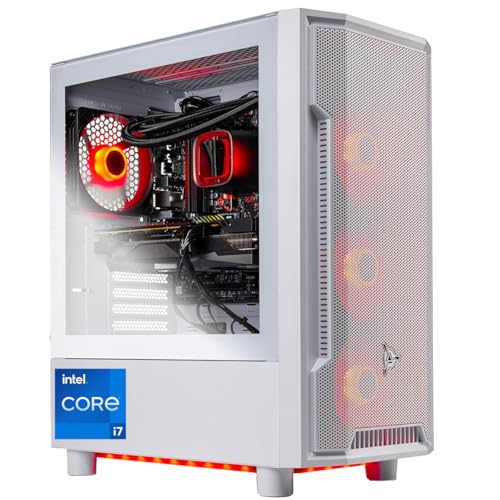
The Skytech Azure 3 is the flagship of this group, pairing an eight-core Ryzen 7 9700X with an RTX 4060, fast DDR5 memory at 6000 speed, and a 360mm liquid cooler with ARGB fans. That combination makes it the strongest choice for a player who games, streams, and edits on the same machine, since the processor has the headroom to handle encoding while a game runs. The white tempered-glass case and the large liquid cooler give it a showpiece look, and the 650W Gold power supply leaves room for a stronger graphics card later. A 1TB NVMe drive completes a specification with no obvious weak point.
Which One Fits Your Situation
A first gaming PC for a new player
Pick the CyberPowerPC Gamer Xtreme VR with the Core i5-13400F. It arrives ready to play with Windows 11 Home, Wi-Fi, and a 1TB drive, so a new player can plug in a monitor and start installing games the same evening. The RTX 4060 covers the most popular games at 1080p, and the DDR5 platform means the tower will not feel dated the moment a new game arrives.
A 1440p setup with a second screen
Pick the CyberPowerPC Gamer Xtreme VR with the Core i7-13700F. Its RTX 4060 Ti carries 16GB of video memory, which holds up better at 1440p in texture-heavy games, and the two DisplayPort outputs plus HDMI make a dual-monitor desk easy to wire. The sixteen-core processor keeps a second screen full of chat and guides from slowing the game down.
Streaming and editing on the same tower
Pick the Skytech Azure 3. The Ryzen 7 9700X has the cores to encode a stream while a game runs, and the 360mm liquid cooler keeps noise down during long sessions. Sixteen gigabytes of fast DDR5 memory and a 1TB NVMe drive give editing software room to work, and the 650W Gold power supply supports a future graphics card upgrade.
A tidy white desk setup with upgrade room
Pick the Skytech Archangel or the Skytech Azure 3, depending on the processor you prefer. Both come in white tempered-glass cases with liquid cooling, so the tower itself becomes part of the desk rather than something hidden underneath it. The Archangel suits an Intel build with a 240mm cooler, while the Azure 3 offers the newer AMD platform and a larger 360mm cooler for longer sessions.
Common Mistakes
Buying for the processor name alone and ignoring the graphics card, which sets the real gaming ceiling.
Choosing a 500GB drive for a library of large modern games, then having to uninstall titles constantly.
Picking a tower with a single video output when the desk already has two monitors waiting.
Assuming DDR4 and DDR5 memory are interchangeable; they use different slots and cannot be mixed.
Forgetting to check Wi-Fi: a tower without it needs a wired network point or a separate adapter.
Frequently Asked Questions
Do these gaming computers include a monitor and keyboard?
No. Each tower in this guide is the computer itself, with Windows 11 Home installed, and a monitor, keyboard, and mouse are bought separately unless a listing states otherwise. The iBUYPOWER SlateMesh listing mentions a gaming keyboard and mouse in some configurations, so read the exact listing before ordering. Budget desk space for the tower itself, which is a full mid-tower case.
Is 16GB of memory enough for gaming?
Yes, for the games most people play today. Sixteen gigabytes covers modern titles alongside voice chat and a browser, and every tower here ships with that amount. Players who edit video, run virtual machines, or keep dozens of browser tabs open while gaming will feel the limit sooner, and those buyers should look for a tower with room to add a second memory kit.
Can I upgrade the graphics card later?
Yes, in most cases, provided the power supply has enough wattage and the case has room for a longer card. The Skytech Azure 3 with its 650W Gold supply is the best prepared for a stronger card, while the 600W unit in the Archangel also leaves some headroom. Always check the exact card length against the case and confirm the power connectors before buying an upgrade.
Do these computers come with Windows installed?
Yes. Every tower in this guide ships with Windows 11 Home, so setup means connecting a monitor and keyboard, signing in, and installing games. No separate operating system purchase is needed. Keep the Windows licence details and the manufacturer’s support information somewhere safe in case the drive ever needs to be reset.
9
99klik Editorial Team
We compare specs, materials and verified owner reviews before a product earns a spot. Rankings are never paid.
Affiliate disclosure. As an Amazon Associate we earn from qualifying purchases at no extra cost to you. Prices accurate as of the date shown.
Discover the best smartwatches for iPhone under 200 with long battery life, built-in GPS and health tracking for everyday fitness on iOS. Top picks compared.
Explore the best 8K video cameras for filmmakers and hybrid shooters, with full-frame sensors, RAW recording, reliable autofocus and pro codecs. Compared.
Best race bike tyres 2: a second, tubeless-ready roundup covering the Continental GP5000 S TR, Schwalbe Pro One TLE, Pirelli P Zero Race TLR and Vittoria Corsa Pro TLR.
A second-round guide to cheap bike helmets for adult everyday riders: four CPSC-certified value picks compared on fit, ventilation, and safety features, with sizing and buying advice — no prices, just value.
Looking for the best bike for wheelies? These 20-inch BMX picks offer the short rear end, strong frame and simple gearing that make learning to wheelie easier.
Shopping for the best beginner road bike under 2000? These mid-range aluminum picks with Shimano Claris and Tiagra groupsets are built to learn on and keep.
An informational guide to 10440 rechargeable batteries: what the size code means, lithium chemistries, voltage and capacity, compatible devices, charging, and safety — and why there is no affiliate product list here.


 Skytech Azure 3 (AMD Ryzen 7 9700X)