We independently review everything we recommend. When you buy through our links, we may earn a commission. As an Amazon Associate we earn from qualifying purchases.
5 Best X99 Motherboards Tomshardware (November 2026)
Compare the best x99 motherboards tomshardware readers still pick for Xeon E5 and Core i7 builds: five MACHINIST LGA 2011-3 boards by size, memory and storage.
Compare the best x99 motherboards tomshardware readers still pick for Xeon E5 and Core i7 builds: five MACHINIST LGA 2011-3 boards by size, memory and storage.
The X99 platform is a legacy high-end desktop (HEDT) design from Intel, built around the LGA 2011-3 socket, quad-channel DDR4 memory and far more PCIe lanes than mainstream boards of its era offered. The original retail boards from the big brands are long out of production, but the platform is far from dead: inexpensive Xeon E5 V3 and V4 processors, cheap DDR4 and still-capable Core i7 chips keep X99 builds popular for home servers, workstations and budget multi-core desktops. The catch is the motherboard itself — if your old board fails, or you are building around a second-hand Xeon, you need a board that is actually in production today.
That is exactly the gap the five boards in this guide fill. All five are current-production MACHINIST motherboards for the X99 platform, sold new on Amazon US, covering ATX, Micro ATX, E-ATX and even a dual-socket option. They were chosen from their Amazon listing names and specifications only, and they differ mainly in form factor, memory capacity, M.2 storage and networking — so the right pick depends on your case, your CPU plans and how much memory your workload really uses.
Quick Picks
Our Short List of 3
Editor’s Choice
1. MACHINIST X99 MR9S LGA 2011-3 ATX Motherboard
Best for: Memory-heavy single-CPU builds, such as virtualisation hosts and workstations that can use up to 256GB of DDR4.
Brand: MACHINIST
Model: X99 MR9S
Platform: Intel X99, LGA 2011-V3 socket
Supported CPUs: Xeon E5 V3/V4, Core i7 5th/6th gen
Best for: Compact X99 builds — small home servers and space-saving workstations that still want quad-socket-class CPU options and up to 128GB of memory.
Every board here uses the LGA 2011-3 (also written LGA 2011-V3) socket and supports Xeon E5 V3 and V4 processors plus 5th and 6th generation Core i7 chips for this platform. That compatibility is the whole point of X99 today: many-core Xeons that were once server-room parts now anchor inexpensive workstations. Before ordering, confirm your exact CPU model appears in the supported generations, and remember that these boards do not accept newer LGA 2066 X299 processors or mainstream LGA 1151 chips — the sockets look similar in photos but are physically and electrically different.
Decide how much memory you actually need
Quad-channel DDR4 is one of X99’s defining features, and the boards here split into clear tiers. The MR9S and the dual-socket X99-D8 carry eight DDR4 slots, with the MR9S rated for up to 256GB; the PR9-H supports up to 128GB; and the MR9A-PRO uses four slots in a quad-channel layout. The X99-D8 additionally supports ECC memory alongside desktop DDR4, which matters for server and workstation builds where error correction is part of the plan. Match the slot count to the memory kit you intend to install — filling all slots in matched sets is what enables quad-channel operation.
Plan storage around M.2 and SATA
All five boards combine SATA 6Gb/s ports with at least one M.2 slot, but the details differ. The dual M.2 boards — the VRM Fan model and the MR9A-PRO — suit builders who want a fast NVMe boot drive plus a second solid-state drive without cables. The MR9S lists an NVMe/SATA M.2 slot, and the PR9-H lists an NVMe/NGFF M.2 slot, so check which drive types a given slot accepts before buying storage. If you run large spinning-disk arrays, count the SATA ports in the listing specifications rather than assuming, because port counts vary between these models.
Pick the form factor your case can hold
Size is the simplest filter and the easiest to get wrong. The X99-D8 is an E-ATX dual-socket board that needs a large case with room for two coolers and a long board; the PR9-H is Micro ATX for compact cases that still want quad-channel memory; the other three are standard ATX. Networking follows a similar split: most boards here provide a single Gigabit LAN port, while the X99-D8 provides dual LAN, which suits server, firewall and virtualisation duties. Measure your case’s motherboard tray and standoff pattern before choosing, especially for the E-ATX board.
The 5 Best Options
1. MACHINIST X99 MR9S LGA 2011-3 ATX Motherboard
Top Pick
1. MACHINIST X99 MR9S LGA 2011-3 ATX Motherboard
Best for: Memory-heavy single-CPU builds, such as virtualisation hosts and workstations that can use up to 256GB of DDR4.
Brand: MACHINIST
Model: X99 MR9S
Platform: Intel X99, LGA 2011-V3 socket
Supported CPUs: Xeon E5 V3/V4, Core i7 5th/6th gen
The MR9S is the straightforward flagship of this group: a full ATX X99 board with eight DDR4 slots and quad-channel support for up to 256GB of memory. For a single-CPU Xeon E5 V3 or V4 build — or a Core i7 for the platform — that memory ceiling is the main reason to pick it over the smaller boards here, since virtualisation hosts, rendering nodes and heavily threaded workloads can all use the extra capacity.
It also covers the modern storage basics with an NVMe/SATA M.2 slot alongside SATA 6Gb/s ports, and it adds a one-key boot and restart function that bench builders and open-frame testers will appreciate. Gigabit LAN handles networking. If your build plan starts with “as much RAM as possible in a normal tower case,” this is the board in the list designed around that brief.
Watch out for: The listing confirms one M.2 slot, so builders planning several NVMe drives should look at the dual M.2 models instead.
Single-CPU builds that want two M.2 drives and extra VRM airflow for sustained multi-core workloads.
Watch out for
The listing does not state a maximum memory capacity, so confirm the supported total in the listing details if a very large memory kit is part of your plan.
This ATX board is the storage-focused single-socket option. Its dual M.2 slots let you run two solid-state drives directly on the board — for example a boot drive and a separate scratch or games drive — while SATA 6Gb/s ports remain available for bulk storage. DDR4 quad-channel support keeps the platform’s memory bandwidth intact, and PCIe 3.0 expansion matches the rest of the X99 family.
The detail that sets it apart in the listing is the VRM cooling fan, aimed at keeping the power delivery area supplied with airflow. That is a thoughtful touch for many-core Xeon chips under sustained load, where the voltage regulator section works hard for long stretches. Gigabit Ethernet covers networking, making this a balanced pick for a hard-working single-CPU desktop.
Watch out for: The listing does not state a maximum memory capacity, so confirm the supported total in the listing details if a very large memory kit is part of your plan.
3. MACHINIST X99-D8 Dual CPU Motherboard, E-ATX (Red)
3. MACHINIST X99-D8 Dual CPU Motherboard, E-ATX (Red)
Best for: Dual-Xeon workstations and home servers that need maximum core counts, ECC memory support and two network ports.
Dual-Xeon workstations and home servers that need maximum core counts, ECC memory support and two network ports.
Watch out for
E-ATX dimensions, two CPU coolers and a suitable power supply are all part of the commitment — check case clearance and your power budget before ordering.
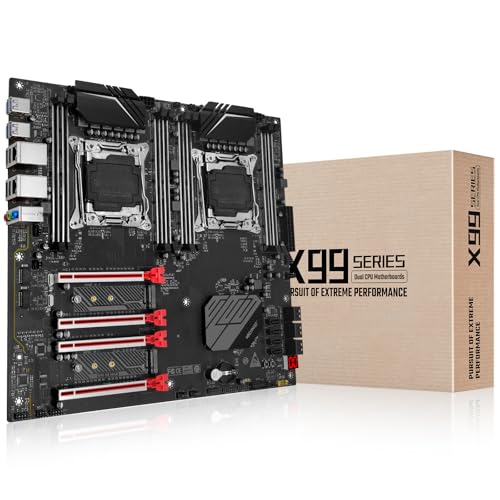
The X99-D8 is the specialist of the group: an E-ATX board with two LGA 2011-3 sockets, so it can run a pair of Xeon E5 V3 or V4 processors — or a Core i7 — in one system. For rendering, compiling, simulation or a home lab that hosts many virtual machines, doubling the CPU count is a capability no single-socket board here can match.
Eight DDR4 slots support both ECC and desktop DDR4 memory, which fits the board’s server and workstation leanings, and dual LAN ports suit machines that separate network traffic or serve multiple roles. An M.2 slot and SATA 6Gb/s ports handle storage, and PCIe 3.0 provides expansion. The red E-ATX board needs a genuinely large case, but for a dual-Xeon build it is the only option on this list.
Watch out for: E-ATX dimensions, two CPU coolers and a suitable power supply are all part of the commitment — check case clearance and your power budget before ordering.
Best for: Compact X99 builds — small home servers and space-saving workstations that still want quad-socket-class CPU options and up to 128GB of memory.
Compact X99 builds — small home servers and space-saving workstations that still want quad-socket-class CPU options and up to 128GB of memory.
Watch out for
The listing names a single M.2 slot and does not detail SATA port counts, so storage-heavy plans should be checked against the full listing specifications.
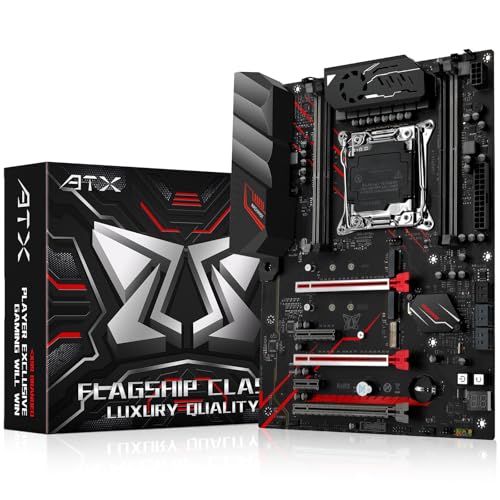
The PR9-H brings the X99 platform down to Micro ATX size, which opens it up to compact cases that cannot fit a full ATX board. Despite the smaller footprint it keeps the essentials that make X99 worthwhile: an LGA 2011-3 socket for Xeon E5 V3 and V4 or Core i7 processors, DDR4 support up to 128GB, and PCIe 3.0 expansion.
Storage is handled by an NVMe/NGFF M.2 slot for a fast boot drive, and Gigabit LAN provides networking. For a small home server, a compact workstation or a space-limited desk setup built around an affordable many-core Xeon, this is the board that fits — literally — where the others cannot.
Watch out for: The listing names a single M.2 slot and does not detail SATA port counts, so storage-heavy plans should be checked against the full listing specifications.
5. MACHINIST X99 MR9A-PRO ATX Gaming Motherboard with Self-Check Card
5. MACHINIST X99 MR9A-PRO ATX Gaming Motherboard with Self-Check Card
Best for: Gaming-oriented X99 desktops and first-time platform builders who value the included self-check card when troubleshooting a new build.
Brand: MACHINIST
Model: X99 MR9A-PRO
Platform: LGA 2011-V3 socket, X99 platform
Supported CPUs: Xeon E5 V3/V4, Core i7 5th/6th gen
The MR9A-PRO is an ATX board on the LGA 2011-3 X99 platform, aimed at gaming-style builds around Xeon E5 V3 and V4 or Core i7 5th and 6th generation processors. It pairs dual M.2 slots with four DDR4 slots running in quad-channel, SATA 6Gb/s storage and USB 3.0 connectivity — a sensible layout for a desktop that mixes fast solid-state storage with a large graphics card in its PCIe 3.0 slots.
Its distinguishing extra is the included debug and self-check card, which helps identify boot problems during assembly and troubleshooting. Anyone who has stared at a freshly built PC that refuses to POST will understand the appeal: a diagnostic aid in the box shortens the path from fault to fix. The listing also states the board is in brand-new condition.
Watch out for: Four memory slots mean a lower practical memory ceiling than the eight-slot MR9S, so plan your kit size around the slots available.
Which One Fits Your Situation
You are building a virtualisation host or memory-hungry workstation
Choose the MACHINIST X99 MR9S. Its eight DDR4 slots and support for up to 256GB in quad-channel give a single Xeon E5 the memory headroom that virtual machines and large datasets demand, in a standard ATX case.
You want a dual-processor machine
Choose the MACHINIST X99-D8. It is the only board here with two LGA 2011-3 sockets, and its ECC memory support and dual LAN ports match the server and workstation work it is built for — just budget for an E-ATX case and two coolers.
Your case is compact
Choose the MACHINIST X99 PR9-H. The Micro ATX layout fits smaller enclosures while keeping support for up to 128GB of DDR4 and an NVMe/NGFF M.2 slot for fast storage.
Storage speed and sustained loads come first
Choose the MACHINIST X99 ATX board with the VRM fan for its dual M.2 slots and active VRM cooling, or the MR9A-PRO if you also want dual M.2 storage plus the self-check card to make a gaming-style build easier to debug.
Common Mistakes
Buying an X299 or other LGA 2066 board for an LGA 2011-3 CPU — the sockets are incompatible despite the similar naming.
Assuming any DDR4 kit will run in quad-channel; you need matched modules installed across the correct slots for the channel layout to work as intended.
Ordering an E-ATX dual-socket board for a mid-tower case without measuring the tray, standoffs and cooler clearance first.
Mixing up M.2 drive types — a slot listed for NVMe/NGFF or NVMe/SATA accepts specific drive interfaces, so match the drive to the slot description.
Forgetting that X99 is a legacy platform: check the listing’s stated CPU generations (Xeon E5 V3/V4, Core i7 5th/6th gen) against the exact processor you own before buying.
Frequently Asked Questions
Which processors do these X99 motherboards support?
The boards in this guide use the LGA 2011-3 socket and list support for Intel Xeon E5 V3 and V4 processors and 5th and 6th generation Core i7 chips for the platform. Always match your exact CPU model against the supported generations named in the board’s listing before ordering.
Can I use ECC memory with these boards?
The MACHINIST X99-D8 explicitly lists support for both ECC and desktop DDR4 across its eight slots, which suits server and workstation builds. The other boards here are listed with standard DDR4 support, so if error-correcting memory is a requirement, the dual-socket D8 is the clear choice in this group.
Are these original boards from the X99 launch era?
No. X99 is a legacy platform, and the boards in this guide are current-production MACHINIST models sold new on Amazon US. They exist to keep Xeon E5 and Core i7 X99 builds practical — replacing a failed board or starting a fresh build — now that launch-era retail boards are out of production.
How many M.2 drives can I install?
It depends on the model. The VRM Fan board and the MR9A-PRO each provide dual M.2 slots, while the MR9S, X99-D8 and PR9-H each list a single M.2 slot alongside their SATA 6Gb/s ports. Check whether a slot is described as NVMe, NVMe/SATA or NVMe/NGFF so the drive you buy matches the interface the slot accepts.
Related guides
Best SSDs for Time Machine backups
Best sensor size for mirrorless cameras
Best internal hard drives for gaming
As an Amazon Associate, we earn from qualifying purchases.
9
99klik Editorial Team
We compare specs, materials and verified owner reviews before a product earns a spot. Rankings are never paid.
Affiliate disclosure. As an Amazon Associate we earn from qualifying purchases at no extra cost to you. Prices accurate as of the date shown.
Find the best sensor size for mirrorless cameras by comparing full-frame, APS-C and Micro Four Thirds bodies on image quality, low light, size and cost.
Compare adjustable chairs for home and office use by seat height, lumbar support, headrest and armrest adjustment, tilt, swivel and stated capacity today.
Galaxy Z Flip vs Galaxy S20 Ultra compared on display, cameras, battery and size, with five Amazon Renewed picks to help you choose the right 2020 Samsung.
Best Japanese vegetable cleaver guide: five nakiri knives compared on steel, edge angle, handle and weight, so you can pick the right one for produce prep.
What is a UPS battery? It is the sealed lead-acid battery inside a UPS that keeps devices running during an outage. See how it works and the best 12V 9Ah picks.
Does RV battery work directly offf batery or throungh nverter? DC loads run off the battery; AC loads need an inverter. See five 12V 100Ah RV batteries.
Can one replace the battery in a t900 tablet? Yes — the Galaxy Tab Pro 12.2 SM-T900 uses a 9500mAh cell. See five replacement kits and what the swap involves.
The best metals for earth battery builds are copper, magnesium, and aluminum-zinc. Compare voltage pairs and forms, and how long each metal lasts in soil.


 4. MACHINIST X99 PR9-H Micro ATX Motherboard (LGA 2011-3)
 5. MACHINIST X99 MR9A-PRO ATX Gaming Motherboard with Self-Check Card