We independently review everything we recommend. When you buy through our links, we may earn a commission. As an Amazon Associate we earn from qualifying purchases.
5 Best X99 Motherboards for Gaming to Buy (November 2026)
Compare five X99 motherboards for LGA 2011-3 gaming builds, from compact Micro-ATX boards to dual-CPU E-ATX models, and pick the right fit for your build.
Compare five X99 motherboards for LGA 2011-3 gaming builds, from compact Micro-ATX boards to dual-CPU E-ATX models, and pick the right fit for your build.
The X99 chipset pairs with Intel’s LGA 2011-3 socket and the Xeon E5 v3 and v4 processors plus fifth and sixth generation Core i7 chips, and it remains a practical route into a high-core-count gaming build. Every board in this guide states X99 in its listing title, so the chipset match is confirmed before any other feature is considered. DDR4 memory, PCIe 3.0 lanes, and M.2 storage appear across the whole set, which keeps the comparison honest and focused on form factor, memory capacity, and expansion.
Choosing well means matching the board to the case and the processor first, then weighing memory limits and networking. A Micro-ATX board suits a compact case, an E-ATX dual-CPU board suits a large tower with room for two processors, and a standard ATX board sits between the two. Read each listing for its stated socket, memory ceiling, and slot layout, and confirm the processor family before ordering anything else.
Quick Picks
As an Amazon Associate we earn from qualifying purchases.
Product
Best for
Key spec from title
MACHINIST X99 V9S Mainboard
Compact Micro-ATX builds
M-ATX, DDR4 Max 128GB
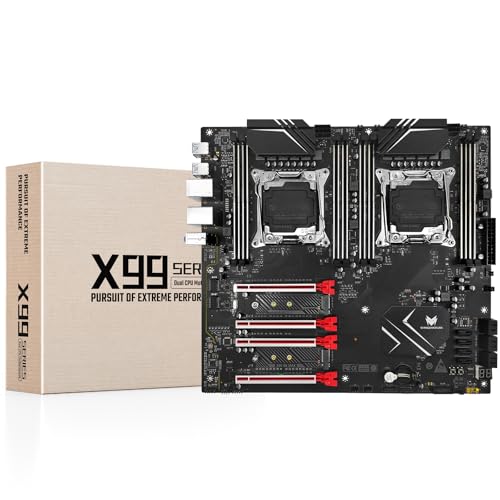
SHANGZHAOYUAN X99 Dual CPU Motherboard
Dual-processor E-ATX builds
8x DDR4 ECC Max 256GB
SHANGZHAOYUAN X99 PR9-H White
Light-colored Micro-ATX builds
Micro ATX, DDR4 Max 128GB
MACHINIST X99 MR9A PRO MAX
ATX builds needing TPM 2.0
Dual M.2, TPM 2.0
ASUS X99-A II
Brand-name ATX gaming builds
5-Way Optimization, SafeSlot
How to Choose
Confirm the Socket and Processor Family
X99 boards use the LGA 2011-3 socket, and every listing here names that socket alongside support for Xeon E5 v3 and v4 processors and fifth and sixth generation Core i7 chips. That combination matters because later Intel sockets and newer Xeon generations do not fit this platform. Check the listing title for both the X99 name and the LGA 2011-3 socket before anything else, and confirm that the processor you own or plan to buy belongs to one of the named families. A board that states only a socket without the X99 chipset name does not meet this guide’s standard, and a processor from outside the named families risks a build that never starts.
Match the Form Factor to the Case
Form factor decides which cases accept the board and how much expansion room remains. The Micro-ATX boards here fit smaller cases and still carry M.2 storage and PCIe 3.0, while the standard ATX boards add slot room and the E-ATX dual-CPU board needs a large tower. Measure the case’s motherboard tray and compare it with the form factor stated in the listing, not with a guess based on the brand. A board that is physically too large for the case cannot be installed at all, and a board that is smaller than the tray wastes mounting points without adding any benefit.
Weigh the Memory Ceiling
Memory capacity separates these boards more than any other single feature. The Micro-ATX and standard ATX boards in this guide state a DDR4 maximum of 128GB, while the dual-CPU E-ATX board states eight DDR4 ECC slots with a maximum of 256GB. ECC memory support appears only on the dual-CPU board’s listing, so builders who need error-correcting memory should weigh that board first. Decide how much memory the build genuinely needs for gaming plus background tasks, and treat the stated ceiling as a hard limit rather than a suggestion.
Check Storage, Networking, and Extras
Storage and networking wording in these listings covers NVMe M.2 slots, SATA connections, and Gigabit Ethernet, with dual M.2 and dual LAN on the larger boards. The MACHINIST MR9A PRO MAX adds TPM 2.0, which matters for builders who want that security module stated in the listing. Count the M.2 slots and LAN ports named in the title, and confirm the SATA standard matches the drives already owned. A board with one M.2 slot limits fast storage expansion, while dual LAN suits builders who run separate networks for gaming and file sharing.
The 5 Best Options
1. MACHINIST X99 V9S Mainboard
Top Pick
1. MACHINIST X99 V9S Mainboard
Best for: Compact gaming builds in Micro-ATX cases.
The MACHINIST X99 V9S is the compact pick in this guide, with a Micro-ATX layout that fits smaller cases while keeping the full X99 feature set from its listing. It supports Xeon E5 v3 and v4 processors plus fifth and sixth generation Core i7 chips through the LGA 2011-3 socket, and its DDR4 ceiling of 128GB leaves generous headroom for gaming and multitasking. NVMe M.2 storage, PCIe 3.0, a WiFi M.2 slot, Gigabit networking, SATA 3.0, and USB 3.0 round out a title that covers the essentials without excess.
2. SHANGZHAOYUAN X99 Dual CPU Motherboard
Runner-Up
2. SHANGZHAOYUAN X99 Dual CPU Motherboard
Best for: Large-tower builds using two processors and maximum memory.
The SHANGZHAOYUAN dual-CPU board is the only model here with two processor sockets, built on an E-ATX layout for large towers and workstation-style gaming builds. Its listing names support for Core i7 fifth and sixth generation chips and Xeon E5 v3 and v4 series processors, with eight DDR4 ECC slots reaching a maximum of 256GB. Two NVMe M.2 slots, two Gigabit LAN ports, SATA 3.0, and PCIe 3.0 give it the widest connectivity in this guide, and the ECC memory support suits builders who value error correction alongside raw capacity.
3. SHANGZHAOYUAN X99 PR9-H White
3. SHANGZHAOYUAN X99 PR9-H White
Best for: White-themed compact builds on the X99 platform.
The SHANGZHAOYUAN X99 PR9-H White brings a light-colored finish to the Micro-ATX class, which suits builders planning a white-themed case without giving up the X99 platform. Its listing states support for Xeon E5 v3 and v4 processors and Core i7 series chips, DDR4 memory to a maximum of 128GB, PCIe 3.0, M.2 protocol support, and Gigabit LAN. The Micro-ATX size keeps it suitable for compact cases, and the white finish is stated directly in the listing title, so builders matching a color scheme can confirm it before ordering.
4. MACHINIST X99 MR9A PRO MAX
4. MACHINIST X99 MR9A PRO MAX
Best for: ATX builds that want dual M.2 slots and TPM 2.0 stated in the listing.
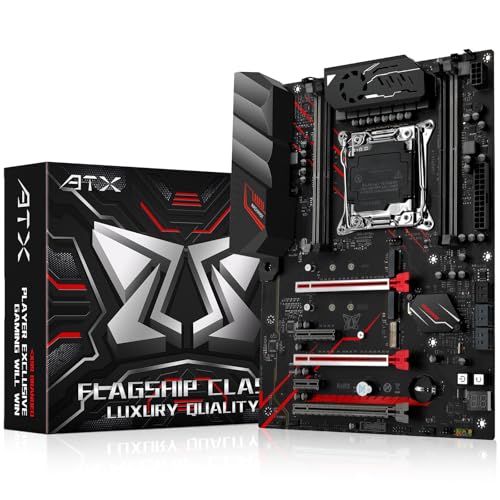
The MACHINIST X99 MR9A PRO MAX is the standard ATX option with the most complete extras list in this guide, including dual M.2 slots and TPM 2.0. It supports Xeon E5 v3 and v4 processors and fifth and sixth generation Core i7 chips on the LGA 2011-3 socket, with DDR4 memory, PCIe 3.0, SATA at 6Gb/s, and Gigabit Ethernet all stated in the listing. The ATX form factor fits the widest range of mid-tower and full-tower cases, making it the straightforward choice for builders who want a full-size board without moving to E-ATX.
5. ASUS X99-A II
5. ASUS X99-A II
Best for: Builders who want a brand-name X99 ATX board with stated optimization features.
The ASUS X99-A II is the established brand-name board in this guide, carrying the 5-Way Optimization feature and SafeSlot reinforcement stated in its listing title. It is an X99 ATX motherboard for the LGA 2011-v3 socket, aimed at builders who prefer a board from a long-running motherboard maker with named optimization and slot-reinforcement features. The listing title is shorter than the others here, so builders should read the full listing for memory, storage, and networking details rather than assuming them from the brand name alone.
Which One Fits Your Situation
A Compact Case With Limited Space
Choose a Micro-ATX board, either the MACHINIST V9S or the SHANGZHAOYUAN PR9-H White, and confirm the case accepts Micro-ATX mounting before ordering. Both state DDR4 to 128GB, PCIe 3.0, and M.2 storage, so the decision comes down to finish and the V9S model’s WiFi M.2 slot. Compact builds trade expansion slots for size, and that trade is worth it only when the case genuinely cannot fit a larger board.
A Large Tower Built for Two Processors
Choose the SHANGZHAOYUAN dual-CPU E-ATX board when the build genuinely uses two processors and needs ECC memory to 256GB. Verify the case tray accepts E-ATX and that cooling covers both sockets, since a dual-CPU board in a case built for ATX cannot be installed. The extra memory ceiling and dual LAN ports reward builders running heavy multitasking alongside gaming.
A Standard Mid-Tower Gaming Build
Choose an ATX board, either the MACHINIST MR9A PRO MAX with its dual M.2 slots and TPM 2.0 or the ASUS X99-A II with its stated optimization features. ATX fits the widest range of cases and leaves room for expansion cards, so it suits builders who want flexibility without the size demands of E-ATX. Compare the stated extras carefully, since the two boards differ more in listed features than in size.
A White-Themed Build on a Budget of Space
Choose the SHANGZHAOYUAN PR9-H White when the case window shows the board and the color scheme matters. Its white finish is stated in the listing title, and its Micro-ATX size keeps the build compact while retaining DDR4 to 128GB and M.2 support. Confirm the rest of the components match the theme, since a single white board does not carry a whole color scheme alone.
Common Mistakes
Buying a processor from outside the Xeon E5 v3/v4 and fifth and sixth generation Core i7 families named in the listings.
Ordering an E-ATX board for a case that only accepts ATX or Micro-ATX mounting.
Assuming ECC memory support on a board whose listing does not state it.
Treating a socket-only listing as proof of the X99 chipset without the chipset name in the title.
Skipping the memory ceiling check and buying more memory than the board states it supports.
Frequently Asked Questions
Does every board here use the LGA 2011-3 socket?
Yes. Every listing in this guide names the LGA 2011-3 socket, written as LGA 2011-3 or LGA 2011-v3, alongside the X99 chipset name. That socket is the defining physical match for this platform, and a board without that socket wording should not be treated as an X99 board. Confirm both the socket and the chipset name in the listing title before ordering.
Which board supports the most memory?
The SHANGZHAOYUAN dual-CPU E-ATX board states the highest ceiling, with eight DDR4 ECC slots and a maximum of 256GB. The Micro-ATX boards and the boards with stated ceilings in this guide list DDR4 to a maximum of 128GB. The MACHINIST MR9A PRO MAX listing states DDR4 without a ceiling, so its maximum should be confirmed on the listing before memory is purchased.
Do these boards support NVMe M.2 storage?
The MACHINIST and SHANGZHAOYUAN listings in this guide state M.2 support, with the dual-CPU board and the MR9A PRO MAX each stating two M.2 slots. The ASUS X99-A II listing title states no storage details, so its M.2 support should be verified on the full listing. Count the M.2 slots named in the listing rather than assuming them from the chipset alone.
Is a dual-CPU board better for gaming?
Not necessarily. A dual-CPU board suits builds that run heavy multitasking, servers, or workstation tasks alongside gaming, and it needs a large case plus cooling for two sockets. Most gaming builds run a single processor, so a Micro-ATX or ATX board usually fits better and costs less in case and cooling demands. Choose dual-CPU only when two processors are genuinely part of the plan.
9
99klik Editorial Team
We compare specs, materials and verified owner reviews before a product earns a spot. Rankings are never paid.
Affiliate disclosure. As an Amazon Associate we earn from qualifying purchases at no extra cost to you. Prices accurate as of the date shown.
Compare four infrared gas grills from Amazon listings, from a four-burner Amplifire cabinet to a portable TRU-Infrared grill, with burner and size specs.
Compare five bowhunting arrows by spine, grains per inch and straightness: Easton 6.5 Bowhunter, Gold Tip Hunter XT, Easton FMJ and two Victory builds.
Four 1x prism sights with etched reticles compared on eye relief, reticle design, brightness settings and weight, plus a clear pick for each rifle setup.
Compare the best hand pruning saws for garden and trail work, from compact folders to pro curved blades, and pick the right blade length for your branches.
Find grass seed that grows in Ohio shade, from dense-shade mixes that need only a few hours of sun to fast-establishing blends for patchy lawns under trees.
Compare bypass pruning shears from Felco, ARS, Fiskars and gonicc by cut capacity, blade steel and grip fit, with picks for large hands and weaker grips.



 4. MACHINIST X99 MR9A PRO MAX
 5. ASUS X99-A II