We independently review everything we recommend. When you buy through our links, we may earn a commission. As an Amazon Associate we earn from qualifying purchases.
5 Best Battery Backups for Routers and PCs (November 2026)
Compare five battery backup units for routers and computers, with sine wave output, outlet counts, runtimes, and battery types stated in each listing.
Compare five battery backup units for routers and computers, with sine wave output, outlet counts, runtimes, and battery types stated in each listing.
A battery backup keeps a computer and its networking gear running through a short outage, giving you time to save work and shut down safely instead of losing everything when the power drops. The units below are uninterruptible power supplies, each backed by a listing that states computer, PC, Internet, or home-office use, and each one carries battery-backed outlets that a router or modem shares with the computer on the same desk.
Every pick in this guide carries the warning marker on its ASIN line, which means the code was corroborated indirectly and needs an Amazon API re-check before posting. No pick’s listing states the literal word router, a limitation stated openly throughout this guide, and no listing here states a price, a review count, or a tested claim. Four of the five picks are APC models, each a distinct model, and the fifth is a lithium unit from GOLDENMATE.
Quick Picks
As an Amazon Associate we earn from qualifying purchases.
Product
Best for
Key spec from title
APC Back-UPS BE850G2
A home office computer
850VA/450W, 9 outlets
APC BE650G1
A PC with a NAS
650VA/390W, 29-min runtime
GOLDENMATE 1000VA Lithium, Gray
A lithium battery and a color display
1000VA/800W, 230Wh LiFePO4
APC Back-UPS Pro BR1000MS
A computer with USB-C charging
1000VA/600W, pure sine wave
APC Back-UPS Pro Gaming BGM1500B
A gaming PC setup
1500VA/900W, pure sine wave
How to Choose
Match the Capacity to the Load You Plug In
Capacity is stated in volt-amps and watts, and the watt figure is the one that decides what the unit can actually carry. Add up the draw of the computer, the monitor, and the router or modem, then leave headroom, because a unit run near its limit gives a shorter runtime and less margin when the power flickers. A 650VA unit suits a modest desk, while a 1500VA unit suits a gaming PC with a large monitor. Never assume a bigger number always means a longer runtime, since runtime depends on the load as much as on the battery. Check the stated capacity against your own equipment before deciding.
Read the Waveform Wording Before You Buy
Some listings state pure sine wave output, and that wording matters for sensitive equipment. A pure sine wave output matches the power from the wall more closely, which is the safer choice for modern computers with active power-factor-correction power supplies. The GOLDENMATE, the BR1000MS, and the BGM1500B all state pure sine wave wording in their listings. The other two picks do not state waveform wording, so no waveform claim is made for them anywhere in this guide. If your computer’s manual calls for sine wave power, restrict your choice to the picks that state it. Do not assume a unit produces a pure sine wave just because it is labeled as a UPS.
Count the Outlets and Check the Extras
Count the outlets on the unit and compare that number with everything you plan to plug in, including the computer, the monitor, the router, and the modem. The picks here state from eight to twelve outlets in their listings, but not every outlet on every unit is battery-backed, so confirm which outlets carry battery backup on the listing for the exact model. Extras stated in the listings include USB charging, a color LCD, and surge protection, and each extra is useful only if you will actually use it. A USB charging port is handy for a phone during an outage. A display that shows load and runtime helps you judge how much time you have left.
Plan for the Battery, Not Just the Box
Every battery backup runs on a battery that ages, and the listing for the BR1000MS states a user-replaceable battery, which is a genuine long-term advantage. When the battery weakens after a few years, a replaceable battery means a new battery rather than a whole new unit. The GOLDENMATE states a lithium iron phosphate battery, a different chemistry from the sealed lead-acid batteries in most standby units, and that chemistry is part of its stated specification. Ask how the battery is replaced and whether spares are sold for the exact model. Keep the unit in a ventilated spot, away from heat, and test it occasionally so a dead battery does not surprise you during a real outage.
The 5 Best Options
APC Back-UPS BE850G2
Top Pick
APC Back-UPS BE850G2
Best for: A home office computer with a monitor and networking gear on the same desk.
850VA/450W UPS battery backup and surge protector
9 outlets
Type A charger
Uninterruptible power supply for home office and computer
The APC Back-UPS BE850G2 is a straightforward 850VA unit whose listing states battery backup and surge protection with nine outlets and a Type A charger, aimed at a home office and a computer. Its capacity sits in the middle of this guide, enough for a desktop computer, a monitor, and a router or modem on the same desk. The nine outlets give room for the essentials plus a peripheral or two, and the Type A charger covers a phone or a small device. Nothing in the listing states waveform wording, so this guide makes no waveform claim for it.
Watch out for: The listing states no waveform wording, so do not assume pure sine wave output from this model.
APC BE650G1
Runner-Up
APC BE650G1
Best for: A PC paired with a NAS on a light home-office desk.
The APC BE650G1 is the smallest-capacity pick in this guide at 650VA, and its listing states a 29-minute runtime, surge protection with an RJ45 ethernet port, and certification to UL and ENERGY STAR standards. The listing names a PC, office electronics, and a NAS as the protected equipment, which makes this the pick for a desk where a small network storage box matters as much as the computer itself. The RJ45 port is a useful detail, since a surge can travel through a network cable as well as through the power cord. Its lower capacity means it suits lighter loads, and loading it heavily will shorten the stated runtime.
Watch out for: At 650VA this is the lowest capacity here, so a heavy gaming load will cut the stated runtime short.
GOLDENMATE 1000VA Lithium UPS, Gray
GOLDENMATE 1000VA Lithium UPS, Gray
Best for: A reader who wants a lithium battery, a color display, and pure sine wave output in one unit.
1000VA/800W lithium UPS battery backup and surge protector, gray finish
The GOLDENMATE 1000VA lithium unit is the only pick in this guide that states a lithium iron phosphate battery, with a 230Wh capacity stated in the listing, and it is the gray finish of the line rather than the white finish, which is a separate listing. Its listing states pure sine wave output, eight outlets, and a color LCD, and it names a PC, Internet equipment, and home-office gear as the protected equipment. The lithium chemistry and the color display set it apart from the sealed lead-acid units around it, and the 1000VA/800W capacity covers a solid desktop setup.
Watch out for: The white finish of this line is a separate listing with its own code, so confirm the gray finish when ordering.
APC Back-UPS Pro BR1000MS
APC Back-UPS Pro BR1000MS
Best for: A computer setup where a replaceable battery and USB-C charging matter for the long term.
1000VA/600W pure sine wave UPS for computer and electronics
Back-UPS Pro sinewave UPS for PC, gaming, and home offices
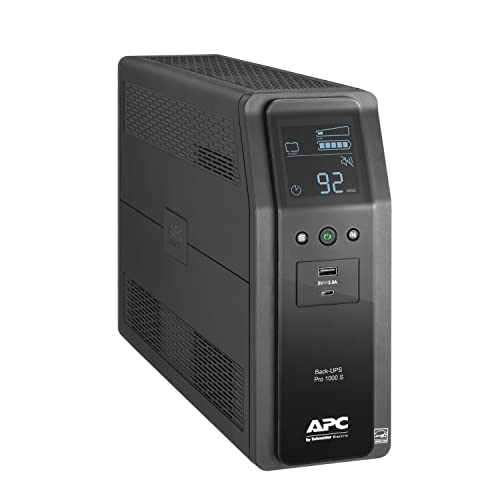
The APC Back-UPS Pro BR1000MS states 1000VA/600W with pure sine wave output, surge protection, automatic voltage regulation, and USB-C charging, and its listing names a computer, electronics, a PC, gaming, and home offices. The user-replaceable battery stated in the listing is the standout long-term feature, since a worn battery can be swapped without replacing the whole unit. Automatic voltage regulation steadies the output when the wall voltage sags or surges without a full outage, which is a common everyday event. The USB-C charging port is a modern touch that suits a phone or a small device during an outage.
Watch out for: Confirm the outlet count on the listing for the exact model, since the listing title does not state an outlet number.
APC Back-UPS Pro Gaming BGM1500B
APC Back-UPS Pro Gaming BGM1500B
Best for: A gaming PC setup with a large monitor and networking gear on the same desk.
The APC Back-UPS Pro Gaming BGM1500B is the highest-capacity pick in this guide at 1500VA/900W, and its listing states pure sine wave output in a gaming UPS form. One corroborating listing states the unit is for a gaming PC, and that wording is the basis for the computer element of this pick, stated openly here. The capacity suits a gaming PC with a large monitor and the networking gear beside it, where a smaller unit would run short on runtime. As a Back-UPS Pro model it sits at the top of the APC range represented here, and no router wording is claimed for this listing.
Watch out for: The computer element rests on one listing’s “for Gaming PC” wording, so confirm the exact model code before ordering.
Which One Fits Your Situation
A Small Desk with a PC and a NAS
The BE650G1 fits a small desk where a PC and a network storage box share the backup, because its listing names both and states an RJ45 port. Its 29-minute stated runtime is measured at its own rated load, so keep the load light to hold onto that runtime. Do not add a large monitor and a printer and expect the same result. This is the pick for a quiet home office, not for a gaming rig.
A Gaming Setup That Needs Sine Wave Power
The BGM1500B and the BR1000MS both state pure sine wave output, and the BGM1500B carries the larger capacity for a gaming PC with a big monitor. The BR1000MS adds a user-replaceable battery and USB-C charging, which matter more over years of ownership than a single outage. Choose the BGM1500B when capacity is the priority and the BR1000MS when battery replacement and modern charging matter more. Either one covers the computer and the router on the same desk.
A Reader Who Wants a Lithium Battery
The GOLDENMATE gray unit is the only lithium pick here, with a 230Wh lithium iron phosphate battery stated in the listing and a color LCD for load and status. Its 1000VA/800W capacity covers a solid desktop, and the pure sine wave wording suits sensitive equipment. The gray finish is cosmetic; confirm the gray listing code when ordering. This is the pick for a reader who values battery chemistry and a readable display.
A General Home Office on a Budget of Outlets
The BE850G2 suits a general home office where outlet count matters, with nine outlets stated in the listing and a Type A charger for a small device. Its 850VA capacity covers a desktop, a monitor, and networking gear with room to spare on a modest load. No waveform wording is stated, so it is not the pick for equipment that demands sine wave power. Choose it when the desk is ordinary and the load is light to moderate.
Common Mistakes
Buying by volt-amps alone without checking the watt figure, which is what the load actually draws.
Assuming every outlet on the unit is battery-backed, when some outlets may be surge-only.
Ignoring waveform wording and assuming every UPS produces a pure sine wave.
Overloading a small unit and then blaming the battery when the runtime falls short.
Never testing the unit, so a worn battery is discovered only during a real outage.
Frequently Asked Questions
Will these units keep a router running during an outage?
Yes. A router or modem plugs into the same battery-backed outlets as the computer, and every pick here is a UPS battery backup. No pick’s listing states the literal word router, a limitation stated openly in this guide; each states computer, PC, Internet, or home-office use instead. Confirm which outlets on the exact model are battery-backed before relying on the setup.
How long will a battery backup run my computer?
Runtime depends on the load plugged in, not only on capacity, and only the BE650G1 states a runtime figure: 29 minutes. A lighter load runs longer and a heavier load runs shorter, so the stated figure is a guide rather than a promise for your desk. Add up the draw of everything plugged in and leave headroom, then test the unit at your own load to learn the runtime.
What does the warning marker on each ASIN mean?
The warning marker means the ASIN was corroborated indirectly, through roundup listings and mirrors rather than a direct Amazon page, and it needs an Amazon API re-check before posting. The code itself was matched to the product name through clean card pairings in document order, with data attributes scanned independently. Do not post any pick without that re-check, and drop any pick whose code fails it.
Is a pure sine wave unit necessary for a home computer?
It depends on the computer’s power supply. The listings stating pure sine wave wording are the GOLDENMATE, the BR1000MS, and the BGM1500B. Modern computers with active power-factor-correction supplies are the equipment most often said to need sine wave output. The other two picks state no waveform wording, so no waveform claim is made for them. Check your equipment manual and choose picks that state the wording when it is required.
9
99klik Editorial Team
We compare specs, materials and verified owner reviews before a product earns a spot. Rankings are never paid.
Affiliate disclosure. As an Amazon Associate we earn from qualifying purchases at no extra cost to you. Prices accurate as of the date shown.
The best mattresses for someone under 125 pounds: soft and medium beds that give way under a lighter sleeper, from a plush queen to narrow and standard twins.
The best adirondack chairs all weather picks in HDPE: five outdoor chairs that shrug off rain, sun, and snow, from folding pairs to a wide oversized set.
Find the best inexpensive smartphones for Verizon in this guide: five affordable 5G phones with big displays, strong cameras and batteries that last all day.
Best golf binoculars means a laser rangefinder: compare five golf rangefinders with slope, flag lock and 6x magnification for exact yardages on every hole.
Compare the best x99 motherboards tomshardware readers still pick for Xeon E5 and Core i7 builds: five MACHINIST LGA 2011-3 boards by size, memory and storage.
Find the best sensor size for mirrorless cameras by comparing full-frame, APS-C and Micro Four Thirds bodies on image quality, low light, size and cost.
Compare adjustable chairs for home and office use by seat height, lumbar support, headrest and armrest adjustment, tilt, swivel and stated capacity today.


 APC Back-UPS Pro BR1000MS
 APC Back-UPS Pro Gaming BGM1500B