We independently review everything we recommend. When you buy through our links, we may earn a commission. As an Amazon Associate we earn from qualifying purchases.
Best 4-Inch Studio Monitors for Small Desks and Rooms
Compare the best 4-inch studio monitors for small desks, from Edifier MR4 and Mackie CR4-X to Pioneer DM-40D and AIAIAI Unit-4, by drivers and inputs.
Compare the best 4-inch studio monitors for small desks, from Edifier MR4 and Mackie CR4-X to Pioneer DM-40D and AIAIAI Unit-4, by drivers and inputs.
A 4-inch studio monitor is the size many small rooms actually need. The woofer is large enough to present voices, guitars, keyboards, and the upper part of a bass line with some body, yet the cabinet stays small enough to sit on a desk beside a laptop, an audio interface, and a MIDI controller without pushing everything else aside. For bedroom producers, video editors, streamers, and DJs who practice at home, that balance matters more than sheer output, because a monitor that has to be turned down, pushed against a wall, or placed far off axis rarely gives a clear picture of a mix.
This guide reads the keyword in its most useful sense, as 4-inch studio monitors, and compares four powered models that share that woofer size while taking different approaches. The Edifier MR4 is a straightforward wired near-field pair with balanced inputs and front controls. The Mackie CR4-X is a multimedia-leaning pair with several input types and a choice of which side carries the volume control. The Pioneer DJ DM-40D adds a sound-mode switch aimed at both DJ work and production. The AIAIAI Unit-4 Wireless+ takes the opposite route, with battery power and low-latency wireless audio for rooms where cables and fixed positions are the main problem.
As an Amazon Associate, we earn from qualifying purchases.
How to Choose
Start with placement, because a 4-inch monitor lives or dies by where it sits. The drivers should point toward the listening position, with the tweeters close to ear height when seated. On a desk, that often means small stands or foam pads that raise and slightly angle the cabinets, rather than placing the speakers flat and firing at chest level. Leave some space behind a rear-ported cabinet where possible, and avoid corners, which exaggerate low frequencies and make a small woofer sound heavier and less defined than the recording really is. Symmetry helps as well: equal distance from side walls and an equal distance to each ear gives a more stable stereo image.
Next, be realistic about bass. A 4-inch woofer cannot reproduce the lowest octave of electronic music or film sound with real weight, and no cabinet tuning changes that physical limit. What a good design can do is present the midrange honestly, keep voices intelligible, and show the attack and pitch of bass instruments. Listeners who mix bass-heavy music should check low end on headphones as a second reference.
Inputs decide how easily a pair fits an existing setup. Balanced quarter-inch TRS suits an audio interface, while unbalanced RCA suits a DJ controller or a simple desktop source. A front auxiliary input and headphone output are convenient for quick checks and late sessions. Wireless links are useful for moving speakers between rooms, but a wired connection remains the simplest choice for tracking and for lip-sync-sensitive video work unless the maker specifies a low-latency system designed for monitoring.
Amplifier power should be read alongside intended distance. These are near-field tools for a listener an arm’s length to a few feet away, not for filling a large room, so clarity at low to moderate volume matters more than maximum level. Tone controls or selectable voicing modes can help adapt a pair to a desk boundary or a bright room. Also check how the pair is powered, the length of the link cable between speakers, and whether the volume control sits within reach of a seated listener.
The Edifier MR4 is the most conventional studio choice in this group. It is a powered pair in MDF cabinets, with a 1-inch silk dome tweeter and a 4-inch composite woofer in each cabinet, driven by a Class D amplifier rated at 21 watts per channel. The tuning aim stated by the maker is a near-flat response curve for music creation, and the speaker offers two listening modes, a monitor mode and a music mode, selected from the front panel. That distinction is useful in practice: the flatter setting suits editing and mixing decisions, while the second setting can serve general listening without changing speakers.
Connection is a strength for the size. The rear panel provides a balanced quarter-inch TRS input for an interface or mixer and an unbalanced RCA input for a computer, controller, or media player. A front auxiliary input and headphone output handle quick connections without reaching behind the desk. The same front control adjusts volume and power and switches modes, so the everyday controls sit on the speaker rather than in software. Bass and treble adjustment on the rear allows a modest correction for a desk that adds low-end weight or a room that dulls the top end, although small changes work better than large ones.
On a small desk, the MR4 cabinets are tall enough to benefit from pads or short stands that lift the tweeters toward ear level. The design suits spoken-word editing, acoustic instruments, pop, and general production where vocal clarity matters. Listeners working on dense electronic tracks should still cross-check the lowest frequencies on headphones, as with any 4-inch woofer, and should avoid placing the rear of the cabinet hard against a wall if the low end starts to dominate. For a wired home studio that begins with an interface, this is a coherent, self-contained starting point.
Who It Suits
The MR4 suits home producers and editors who connect through an audio interface and want a balanced input, a headphone socket, and tone adjustment in one compact pair. It is less suited to listeners who need wireless playback, battery power, or strong reproduction of the deepest bass frequencies.
The Mackie CR4-X approaches the same desk from a multimedia direction. Each cabinet uses a 4-inch polypropylene-coated woofer and a three-quarter-inch ferrofluid-cooled silk dome tweeter, with 50 watts of total power for the pair and all-wood cabinets. Mackie positions the CR-X series for content creation, production, and personal listening, and the feature list reflects that mix. The speakers accept quarter-inch TRS, RCA, and eighth-inch auxiliary sources, so an interface, a computer, and a phone or handheld device can all be connected without unusual adapters.
A practical detail is the powered-speaker position switch. The listener can choose whether the powered cabinet, with the volume control and connections, sits on the left or the right. On a real desk, where a power outlet, an interface, or a monitor arm may favor one side, that choice removes an otherwise annoying cable problem. The front panel carries the volume control and a headphone output that automatically mutes the speakers when headphones are connected, which makes late-night editing and quick spoken-word checks simpler.
The CR4-X voicing is intended to be clear and present rather than distant, which helps dialogue, tutorials, and streaming work where intelligibility is the priority. Music producers can use the pair as a compact near-field reference, with the same caution about low-frequency limits that applies to every model here. Because the cabinets are ported, a little distance from a rear wall and a stable, raised position will give a cleaner result than placing them in a corner or inside a shelving unit. For a desk that serves work, video, and music in equal measure, the range of inputs is the main reason to choose this pair.
Who It Suits
The CR4-X suits creators whose desk alternates between an interface, a computer, and a portable source, and who value a front headphone output and flexible powered-speaker placement. It is less suited to listeners who want balanced-only studio wiring, selectable production voicings, or wireless and battery operation.
The Pioneer DJ DM-40D is a 4-inch desktop pair designed to move between DJ practice and music production. Each speaker uses a 4-inch fiberglass woofer and a three-quarter-inch soft dome tweeter, powered by a Class D amplifier rated at 38 watts for the pair. A front-loaded bass reflex system is used to keep low frequencies tight from a compact cabinet, and grooves in the bass reflex ducts are intended to reduce air friction as air moves through the port. The result, on paper, is a small monitor that aims for punch and clarity at a desk rather than maximum depth.
The defining control is the two-way sound mode switch. One setting is optimized for DJ use and the other for production, with digital signal processing changing the voicing when the switch is moved. That suits a common home setup, where the same speakers cue a practice set in the evening and edit a recording the next morning. The production setting is the appropriate starting point for mixing decisions, and the DJ setting is better treated as a listening and performance voicing.
The DM-40D offers RCA and mini-jack line inputs, plus a front headphone output for quiet practice. There is no balanced TRS input, so interface owners who need a balanced connection should choose another model in this guide. The front bass reflex design is more forgiving of placement near a wall than a rear-ported cabinet of the same size, although ear-level tweeters still give the clearest stereo image.
Who It Suits
The DM-40D suits DJs and producers who share one desk between practice and production and who connect from a controller or an unbalanced desktop source. It is less suited to interface owners who specifically need balanced TRS inputs, or to listeners who want Bluetooth, battery power, or rear tone controls.
The AIAIAI Unit-4 Wireless+ is the outlier in this guide, and the difference is mobility. Each monitor uses a 4-inch high-excursion paper cone woofer and a 1-inch silk dome driver, and the pair is rated at 80 watts of maximum output power and a maximum level of 105 dB per pair. The speakers are battery powered and use the W+ Link wireless system, which the maker specifies as uncompressed audio at 16-bit and 44.1 kilohertz, with a transmitter included in the box. That combination allows a pair to move from a desk to a writing session in another room, or to a temporary editing setup, without moving an interface, a power strip, and a bundle of cables at the same time.
Portability changes the buying questions. Battery operation is valuable only if the speakers are genuinely moved and used away from a fixed desk; a permanent setup gains little from it and gives up the simplicity of a wired pair that is always ready. A wireless link and internal batteries do make it easier to position the cabinets for symmetry rather than for cable reach. AIAIAI also presents the Unit-4 as a repairable, maintainable product, which suits buyers who expect to keep monitors for many years. The trade-off is complexity: transmitters, charging, and pairing are extra steps the wired pairs in this guide do not have.
Who It Suits
The Unit-4 Wireless+ suits producers, writers, and editors who move between rooms or temporary setups and who want a 4-inch monitor pair without a fixed cable run. It is less suited to a permanent desk where a wired pair is simpler, or to buyers who do not need battery power and wireless audio.
FAQ
Are 4-inch studio monitors enough for mixing?
They can be enough for many home mixes, especially for vocals, acoustic instruments, podcasts, and pop arrangements, provided the speakers are placed at ear level and at a sensible near-field distance. The limitation is the lowest bass, which a 4-inch woofer reproduces with less weight and extension than a larger driver. A practical approach is to make balance and midrange decisions on the monitors, then check the low end on headphones or another familiar system before finishing a track.
Do 4-inch monitors need a subwoofer?
Most small rooms do not need one at the start. A subwoofer adds extension, but it also adds placement and level-matching problems, and a poorly integrated subwoofer can make bass decisions less reliable rather than more reliable. Learning one pair of monitors in a fixed position usually gives better results first. A subwoofer becomes more reasonable when the room is treated, the crossover and level can be set carefully, and the music genuinely depends on the lowest octave.
Should studio monitors be placed on a desk or on stands?
Either position can work if the tweeters end up near ear height and the cabinets are stable and decoupled from a resonant surface. Stands behind a desk often give the best distance and symmetry, while short desk stands or isolation pads are the practical answer when floor space is limited. Speakers placed flat on a desk, below ear level and close to a wall, tend to sound boomy in the low mids and vague in the stereo image, whatever their size.
Is Bluetooth good enough for studio monitors?
Bluetooth is convenient for casual listening, reference tracks from a phone, and checking how a finished mix sounds through a simple playback path. For recording and detailed editing, a wired connection is simpler and avoids codec and latency questions. The exception in this guide is a purpose-built low-latency wireless monitoring system, which is a different design goal from ordinary Bluetooth streaming and should be judged on the maker’s stated monitoring specification.
Final Verdict
For a conventional wired home studio, the Edifier MR4 is the most complete starting point here, combining a balanced TRS input, RCA and auxiliary connections, a front headphone output, tone adjustment, and separate monitor and music modes. The Mackie CR4-X better fits a mixed-use desk, where several sources need to connect and choosing which side holds the controls solves a layout problem. Both pairs ask for careful placement and a headphone check for deep bass.
The Pioneer DJ DM-40D makes the clearest case for a listener who both DJs and produces, with its DSP sound-mode switch and front-loaded bass reflex design, as long as balanced inputs are not required. The AIAIAI Unit-4 Wireless+ is the specialist choice, justified when battery power, low-latency wireless audio, and a repairable, movable design matter more than the simplicity of a fixed wired pair. Choose by connection and by how the desk is actually used, then spend the first sessions learning the chosen pair at a consistent distance and volume. That familiarity, more than any single specification, is what makes a small monitor a reliable reference.
Compare five 5G capable phones for everyday use, from a simple large-screen handset to a rugged outdoor model, with storage, display, and carrier guidance.
Best ultralight electric scooters for adult urban travel: five folding scooters at or under 31 lb for stairs and trains, compared for weight and brakes.
Best Roland portable digital pianos: five 88-key Roland pianos for home practice, lessons and gigs, compared for touch, tone, speakers and portability.
Find the best action cameras for skiing, from cold-proof flagships to a 360 camera and a value pick. Compare stabilization, battery life, and ski mounts.
The best mattresses for someone under 125 pounds: soft and medium beds that give way under a lighter sleeper, from a plush queen to narrow and standard twins.

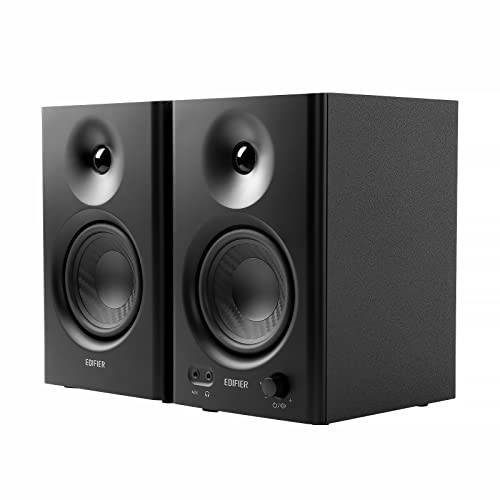 Edifier MR4 Powered Studio Monitor Speakers
 Mackie CR4-X Creative Reference Multimedia Monitors
 Pioneer DJ DM-40D Desktop Active Monitor Speakers
 AIAIAI Unit-4 Wireless+ Powered Studio Monitors